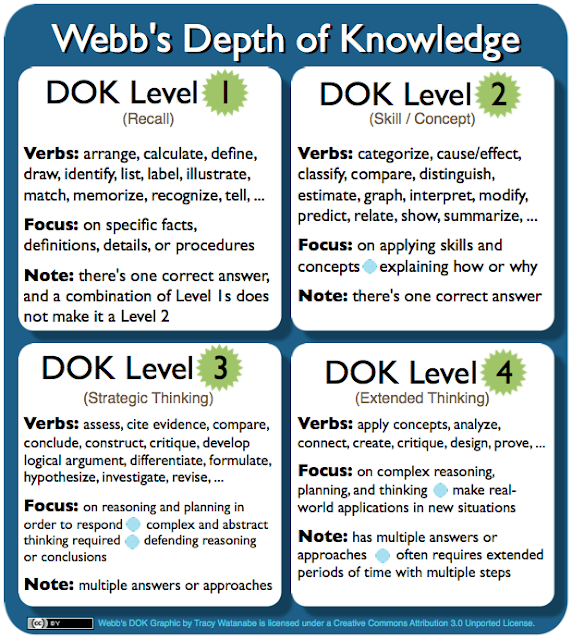
A little over a year ago, I read Higher-order thinking is the exception rather than the norm for most classrooms on Scott McLeod's blog, Dangerously Irrelevant , and have been mulling it over, wondering if our school district is any different. Over the past year, our teachers periodically collect data with their teams on the types of questions/tasks they ask students. One teacher records teacher questions and the other records student responses on a shared Google Doc ; then teams sort through their own data, plotting teacher questions by Bloom's Revised Taxonomy , and student responses to those questions/tasks with Webb's Depth of Knowledge (DOK) . The 2012-2013 data showed we were not very different from other districts; therefore, our teams set their own goals for higher-order thinking and depth of knowledge. The data so far for the 2013-2014 school year shows questions asked of students are up and down the Bloom's ladder, equally distributed (with a little...
 Email tracywatanabe2 (at) gmail (dot) com

Comments
Post a Comment
Directions for posting:
1) Choose "Comment As" first. If you don't have a Google/Blogger account, you can choose Name/URL and type in your name, then place the web site that best describes you in the URL (i.e. www.ajusd.org). Or, you can choose "Anonymous".
2) You may need to press "Post Comment" more than one time.
It is always wise to copy your comment before pressing "Post Comment" just in case something happens.
3) Type in the word verification.
4) If you did everything correctly, it will state, "Your comment has been saved and will be visible after blog owner approval." If you do not get that message, please try again.
Click here for a tutorial on how to comment.
Thank you!