Posts

Digital Storytelling and Stories for the Desktop

Image
Digital storytelling is an art form conveying a message. It uses images and voice narration to convey emotion with the message, and to ignite empathy from the audience. It incorporates storyboarding and writing a script. It is created with digital tools and published on the Internet. I often think of digital storytelling as something done in first person because it creates that personal connection. Whereas, I think of a digital story as an anecdote or story typed or narrated in third person. Image attribution: Lyn Hilt's Slideshare , used with permission. Original work: "Writing- Pen & Paper" CC-by Laurie Richie Benefits Here are some of the many benefits of digital storytelling and digital stories: The 21st century skills and ISTE's Standards  applied are critical and creative thinking; written, oral, and digital communication; collaboration; authentic learning; digital fluency;...

Readability Tech Tools for ELA Standards

Image
ELA Text Complexity Readability levels are an important ingredient for figuring out text complexity . Reading Standard 10 specifically states that students must read complex text, "Read and comprehend complex literary and informational texts independently and proficiently." Text complexity reminds me of a s'more. It contains three main parts, and while you can talk about each ingredient separately, it's not really a s'more until you put them all together. Tools for readability Have you ever wondered if the text on a website is the appropriate reading level for your students? Here are some tools for assessing the quantitative measures of readability: Online-Utility.org : Determines the Flesh-Kincade Reading Level by copying and pasting the text into the box. Lexile Analyzer : You can scan your text (or type it in) to see the complexity of what you've written (or text in any website). Note, you'll have to register to use this site. ATO...

Creating in Educreations

Image
Educreations received a slight makeover, and it now has a few new features that allows teachers to push lessons out to student accounts, while also being able to see published student work for those enrolled in her/his classes. What is Educreations? Educreations is an interactive whiteboard and screencasting tool for both the iPad and desktop computer. Its features include drawing, annotation, and narration. You can insert photos straight from your camera, photo album, Dropbox, Google Drive, and from the Internet. Benefits Students can use Educreations to investigate ideas , and create videos to share their thinking and learning. Teachers can use student artifacts as formative assessments as evidence of learning or misconceptions/gaps in understanding.   Teachers can use Educreations to send presentations to students as well. How do you use it? How do Teachers sign up and create a Class account? How do students sign up and connect with the Class...

Comments for Community to Enter a State of "Flow" #C4C15

Image
According to Mihaly Csikszentmihalyi, happiness and genuine satisfaction comes from a state of consciousness called flow . To achieve flow, one must be completely absorbed in an activity, a mindful challenge, involving creativity. Those mindful challenges can not be too demanding, nor too easy. This "mindful challenge" reminds me of a volleyball net. If it is set too high, it is too difficult to hit the ball over the net, resulting in giving up the game out. Likewise, if the net is too low, there's not enough challenge to keep my attention, leading to the same outcome of giving up the game. Thus, we need to set the net at the appropriate height, and then we'll start learning how to make changes to improve, which is when we'll become intrinsically motivated by the act. “Most enjoyable activities are not natural; they demand an effort that initially one is reluctant to make. But once the interaction starts to provide feedback to the person's skills, i...

What does it mean to be literate in the 21st century?

Image
There's not a doubt in my mind that technology has changed our world. Information is created, shared, and evaluated differently. People connect, communicate, and go about their daily lives in new ways with the use of technology. Think about the impact of technology on industries like newspapers, publishers, movies, travel agencies, etc. I go online to read the news, view books, and watch movies. I plan vacations, make travel arrangements, and purchase tickets online. I find new recipes and share them with friends through social media. We are in an information revolution. It's changing and disrupting how things are done, and requires new skills to be successful. Therefore, it impacts what it means to be literate, moving beyond reading and writing and into information and digital literacies. New literacies Today, students need to be taught information and research fluency , along with digital citizenship and technology operations and concepts . Click here to ...

Screenshots

Image
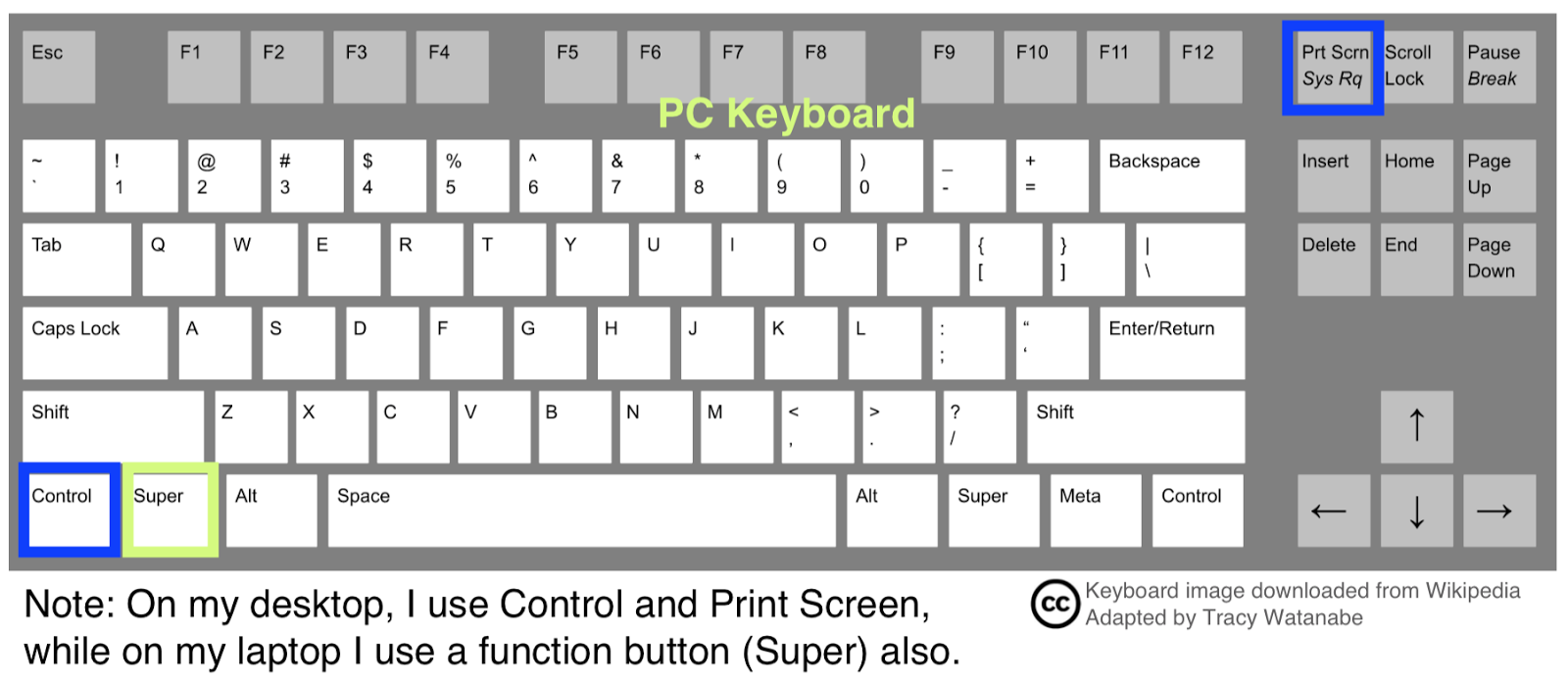
One question I'm asked on occasion is, "How do you capture a copy of what's on your screen?" The procedure differs a little depending on the device. The devices I most frequently use are listed below. On PCs, this is often how I'd do it: Press the “Print Screen” key on the top right of my keyboard. Then open my email, PowerPoint, or Paint. Press CTRL + V to paste the image. Decide if I need to save the image (or crop the image). If so, I like using Paint. On my Mac, I'll: Press Command, Shift, and 4 at the same time. Then pull the crossbars down and around the image you want to capture. You’ll find it on your desktop as a Screenshot. On an iPad, I'll: Press the sleep button and the home button simultaneously. It will save in the Camera Roll album (see icon below). Final thoughts Screenshots are valuable when creating presentations or explaining something from the screen. For example, if there is an error message...

14 Best or Worst from 2014

Image
As I reflect on 2014, I want to share 14 of the best and some of the worst from 2014. 1) Most acknowledged blog post -- Mystery State Skype I received the Editor's Choice Content Award from SmartBrief for my post on the Mystery State Skype. I also had the opportunity to talk with  by Larry Jacobs on  Education Talk Radio  -- ( click here to go straight to archive of radio show). 2) Most visited blog post  --  Digital Storytelling and Stories with the iPad 3 & 4) My favorite post -- Harnessing Powerful Ideas: Leading One-to-One This post was my favorite to write because it helped me collect many ideas about one-to-one, and place it in one space -- my post. Furthermore, I absolutely loved creating the graphics for this post. It was my first experiment with using Canva . 5) Favorite new(ish) tool  (besides Canva) -- Pinterest While Pinterest isn't new, it so happened to be new for me. I had an account before 2014, but it was dur...