Posts

Showing posts with the label 21st Century Learning

Global Collaboration
Image
In order to prepare students to apply rigorous learning to new and real-world situations, educators must provide opportunities that foster critical and creative thinking, communication and collaboration. Importance of Global Collaborations Common Core State Standards demand students to collaborate with diverse partners , thereby expanding students' global awareness . Some of the benefits of collaboration might include: Developing interpersonal skills of working together as a team. Fostering critical thinking skills while working towards a collaborative goal. Increasing comprehension while partaking in conversations and exploring ideas from different perspectives. "Collaborative learning promotes communication among students; it is particularly beneficial for English Learners (ELs) because peer interaction contributes to the development of language," ( CA ELA ELD Framework, Chapter 2 ). New 2016 ISTE Standards for Students I recently attended th...
Urgency with Coding Now for the Future

I've heard Anne Jenks share numerous times the importance of teaching coding in school, especially with so many STEM professions available . If computer science careers are the number one source of jobs in the US, then we should have more computer science graduates, and therefore more coding/programming opportunities in K-12 classrooms. Urgency with coding in classrooms now for jobs in the future #cue16 #gccue pic.twitter.com/oDGiOX7M7d — Tracy Watanabe (@tracywatanabe) March 17, 2016 The time is now to start teaching digital fluency and coding as part of literacy. Being literate in today's world, includes computer literacy. Luckily, there are organizations, such as Code.org , dedicated to giving students opportunities to learn computer science. How do you get started? Below are a few places for getting started: Device Elementary Secondary iPad Daisy the Dinosaur Tickle  (older app) Hopscotch Scratch Jr. Cargo-Bot Tickle Laptop/Desktop Scra...

Deeper Thinking and Revised DOK Flowchart

Image
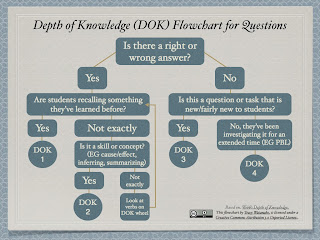
About a year or two ago, I noticed my DOK Flowchart floating around Pinterest . I didn't think much of it because the thought process behind the flowchart was documented on my post titled, Striving for Higher-Order Thinking and Depth of Knowledge . This flowchart was created to help teachers in my former district categorize their own questions by DOK level, to look for patterns and trends, in order to set goals regarding their quest for deeper thinking. It was a flowchart that worked with many question patterns we commonly saw, but was not intended to be definitive. For example, when it came to a question in math, we knew there was a right and wrong answer -- for example, 3X4=12. However, we considered how there were multiple approaches to get to that correct answer. While, that was a discussion we had face-to-face, my original flowchart did not reflect those conversations. Therefore, I revised the flowchart to help clarify: Click here to download as PDF. Below are ...

Posters, Resources, and ELD Standards

Image
I've lived in California for almost a year now, and am becoming very familiar with the California English Language Development Standards . My goal for this post is to share a few of the big ideas I've learned about the CA ELD Standards through the use of two tools: Canva and Tackk . View full version on Tackk Create your own customized Tackk page Tackk I learned about Tackk through +Lisa Johnson (TechChef4u)  when I stumbled upon her post about Tackk . I quickly realized that it was a useful tool to create and curate content. I think of it as an online poster or magazine article. It seems like an easy tool to use because you can just drag and drop content into it. Headlines, text, images, graphics, vidoes, audio and playlists, GIFs and media, Google Maps, PayPal, contact forms and RSVPs can be added. I've downloaded Tackk on my iPad, use it on my desktop, and can install it on my Chrome Browser . There are also several templates for educational u...

Digital Storytelling and Stories for the Desktop

Image
Digital storytelling is an art form conveying a message. It uses images and voice narration to convey emotion with the message, and to ignite empathy from the audience. It incorporates storyboarding and writing a script. It is created with digital tools and published on the Internet. I often think of digital storytelling as something done in first person because it creates that personal connection. Whereas, I think of a digital story as an anecdote or story typed or narrated in third person. Image attribution: Lyn Hilt's Slideshare , used with permission. Original work: "Writing- Pen & Paper" CC-by Laurie Richie Benefits Here are some of the many benefits of digital storytelling and digital stories: The 21st century skills and ISTE's Standards  applied are critical and creative thinking; written, oral, and digital communication; collaboration; authentic learning; digital fluency;...

Creating in Educreations

Image
Educreations received a slight makeover, and it now has a few new features that allows teachers to push lessons out to student accounts, while also being able to see published student work for those enrolled in her/his classes. What is Educreations? Educreations is an interactive whiteboard and screencasting tool for both the iPad and desktop computer. Its features include drawing, annotation, and narration. You can insert photos straight from your camera, photo album, Dropbox, Google Drive, and from the Internet. Benefits Students can use Educreations to investigate ideas , and create videos to share their thinking and learning. Teachers can use student artifacts as formative assessments as evidence of learning or misconceptions/gaps in understanding.   Teachers can use Educreations to send presentations to students as well. How do you use it? How do Teachers sign up and create a Class account? How do students sign up and connect with the Class...

Comments for Community to Enter a State of "Flow" #C4C15

Image
According to Mihaly Csikszentmihalyi, happiness and genuine satisfaction comes from a state of consciousness called flow . To achieve flow, one must be completely absorbed in an activity, a mindful challenge, involving creativity. Those mindful challenges can not be too demanding, nor too easy. This "mindful challenge" reminds me of a volleyball net. If it is set too high, it is too difficult to hit the ball over the net, resulting in giving up the game out. Likewise, if the net is too low, there's not enough challenge to keep my attention, leading to the same outcome of giving up the game. Thus, we need to set the net at the appropriate height, and then we'll start learning how to make changes to improve, which is when we'll become intrinsically motivated by the act. “Most enjoyable activities are not natural; they demand an effort that initially one is reluctant to make. But once the interaction starts to provide feedback to the person's skills, i...

What does it mean to be literate in the 21st century?

Image
There's not a doubt in my mind that technology has changed our world. Information is created, shared, and evaluated differently. People connect, communicate, and go about their daily lives in new ways with the use of technology. Think about the impact of technology on industries like newspapers, publishers, movies, travel agencies, etc. I go online to read the news, view books, and watch movies. I plan vacations, make travel arrangements, and purchase tickets online. I find new recipes and share them with friends through social media. We are in an information revolution. It's changing and disrupting how things are done, and requires new skills to be successful. Therefore, it impacts what it means to be literate, moving beyond reading and writing and into information and digital literacies. New literacies Today, students need to be taught information and research fluency , along with digital citizenship and technology operations and concepts . Click here to ...

14 Best or Worst from 2014

Image
As I reflect on 2014, I want to share 14 of the best and some of the worst from 2014. 1) Most acknowledged blog post -- Mystery State Skype I received the Editor's Choice Content Award from SmartBrief for my post on the Mystery State Skype. I also had the opportunity to talk with  by Larry Jacobs on  Education Talk Radio  -- ( click here to go straight to archive of radio show). 2) Most visited blog post  --  Digital Storytelling and Stories with the iPad 3 & 4) My favorite post -- Harnessing Powerful Ideas: Leading One-to-One This post was my favorite to write because it helped me collect many ideas about one-to-one, and place it in one space -- my post. Furthermore, I absolutely loved creating the graphics for this post. It was my first experiment with using Canva . 5) Favorite new(ish) tool  (besides Canva) -- Pinterest While Pinterest isn't new, it so happened to be new for me. I had an account before 2014, but it was dur...

Formative Assessment with Plickers

Image
Formative assessment helps teachers make data-informed decisions to plan for and/or adjust instructional activities, identify potential misconceptions, monitor the pace of instruction, etc. While there are many ways to formatively assess students, I recently saw  Eric Sheninger use Plickers during his workshop at the Ventura County Office of Education, and thought, what an easy and inexpensive way to quickly assess groups! . @E_Sheninger Using Plickers #l3vcoe pic.twitter.com/rEHcTMgNKb — Tracy Watanabe (@tracywatanabe) November 7, 2014 Purpose and benefits Collect data from multiple choice or true/false questions from a group. View data as a group snapshot in a graph, or view individual data from audience. Quick, low-tech tool to use, especially when you don't have the budget for clickers. Technology and prep Teacher/Facilitator creates an account at Plickers . Download app for portable device: iTunes or Google Play . Print out a set of reusable  car...

Mystery State Skype

Image
Mystery State Skype isn't a new idea, it's basically taking learning geography and placing it in a game format like Twenty Questions via Skype, by asking questions to guess the location of the other classroom. Not only does this connect students from across the country (or globe), but it also gives a context for students to apply geography with critical reasoning, collaboration, communication, digital citizenship, and information fluency -- 21st century skills . Skype in the classroom Learning standards What should your students research? I recommend looking at your standards to know what is expected of your students as a starting place. Geography standards --  History-Social Science Content Standards   Consider the research writing standards (see CCSS ELA Writing Standards #7 - 9 ) Converse and collaborate with diverse partners -- CCSS ELA Speaking and Listening #1 21st Century Skills -- ISTE Standards for Students Note that your students will read information...

Formative Assessment and Google Forms

Image
Formative assessment informs educators about student learning, and when done correctly , it also informs the students how to improve and move forward with their next goal. Teachers must know how to use the data to drive their instruction. Formative Data by Tracy Watanabe - Created with Haiku Deck, presentation software that inspires Gleaning results from the data and providing specific feedback must be timely, which is why I like using Google Forms (along with other tools). Why Google Forms While there's a plethora of tools that can be used to collect formative data, I am going to focus on Google Forms. Google Forms is an awesome time saver for collecting data in surveys, assignments, mindsets, exit tickets, etc. It aggregates the data collected into a Google Spreadsheet, and gives me a summary of the data in nice graphs as well. For example, below is a Google Form used by a high school teacher. He told me that this tool is a time saver because he can quickly se...

Harnessing Powerful Ideas: Leading One-to-One

Image
How you set up and lead one-to-one is based on your vision for one-to-one. So, what's your vision? Why 1:1? How will students use the tech? For what? The purpose of one-to-one is to give the students ubiquitous access to learning. The device itself is not the purpose of one-to-one -- augmenting students' learning is. Therefore, it's essential to know what change you want to see in your district/school that one-to-one can support. What learning do you want to see, and how will technology make that possible? What does that look like?  How will the students use the technology to accomplish those goals? For me, it's simple, I want to see students using their critical thinking to create, collaborate, communicate, and contribute as digital citizens. How does 1:1 connect to and support other district or site initiatives? One-to-one is a learning initiative, and not a technology program. It should not be treated as something separate or as an add-on . ...
